The Other Trade at the Same Counter
The man from the village pharmacy is at your counter for twenty packs of Napa and ten of Seclo. “The usual: three percent over, one pack free.” Behind him a walk-in waits for a few tablets at MRP. Two trades, one counter, and until now only one of them had a place in the software.
The deal the retail till can’t hold
If you sell to resellers, the village pharmacy, the clinic, the hostel, you already know the two ways this gets recorded, and that neither is good.
The first is to ring it through the retail till and hand-edit every price. Napa’s retail price comes up; you work out cost plus three percent in your head, type it over, move to the next line, do it again. Ten lines, ten sums, a customer waiting. What the record keeps is a retail sale at odd prices, not the deal. “One pack free” has nowhere to go, so the free pack is either sold at zero on a line that looks like a mistake, or quietly handed over and never leaves the stock figure. And on a three percent margin, one slip of arithmetic sells the pack at a loss, and nothing on the screen tells you.
The second is to keep that trade out of the system altogether. A khata for the wholesale side, memory for the rest. Then the stock figure is wrong, because packs left the shelf that the system never saw; the dues are wrong, because the reseller’s baki lives in a notebook; and the profit is wrong, because a good part of the shop’s turnover was never written down. Every report you open is a report on half a business.
Its own door
In MediPharma24, wholesale is a second trade with its own door. Turn on Enable Wholesale Selling under Wholesale Settings, and staff whose role holds the wholesale permission get a separate Wholesale menu beside Sales. For the staff who trade wholesale, the Sales menu reads Retail Sales, so the two doors are never confused; everyone else sees Sales as before. The salesman at the retail counter still sells at MRP, and a wholesale deal is a deliberate act on its own screen, not a price typed over the retail one.
The price is already there
The wholesale screen does not ask you to remember the deal’s arithmetic. Every batch on your shelf already carries a wholesale price, worked out from the basis you choose once in Wholesale Settings:
- Cost plus margin: what the batch cost you, plus the shop’s wholesale margin. Three percent unless you say otherwise.
- MRP less percentage: the MRP printed on the pack, less a percentage. Ten percent unless you say otherwise.
Pick the one your trade quotes in. Goods that deserve a different figure, a company whose terms are tighter, a generic you move in volume, get an exception per product, generic, company or tag. And a price you set on a particular batch yourself stays set: changing the margin or the basis later re-prices everything else and leaves that batch alone.
So when the twenty packs of Napa land on the line, the price is there, from today’s cost of that batch, not from a figure somebody typed months ago.
Entered the way the supplier’s invoice reads
The wholesale form is shaped like the invoices you receive from distributors, because that is the shape the deal is spoken in:
- Each line is in whole packs or in pcs. “20 packs” is 20 packs, “25 pcs” is 25 pcs, never a fraction of a pack.
- Bonus has its own column. “One pack free” is one pack in Bonus, and it leaves the stock figure with the rest.
- A discount per line, as a percentage or a fixed amount, and another on the whole bill, because the trade rounds the bill, not the line.
- The customer is always named. There is no anonymous wholesale sale.
The first wholesale sale marks that customer Wholesale on their record, so the wholesale screen’s customer list offers your thirty resellers before your thousands of patients; the same person can still walk in and buy retail on the same record, dues and history in one place.
The invoice the reseller takes away shows each line in packs and in total pcs, the bonus in its own column, and the discount, so he can count packs at his end and still check every line against its total.
The warning before the loss
This is the part a hand-edited retail sale could never do. A wholesale line that would sell below what that batch costs you today, counting the discount and the free packs, is flagged before you save. When a Wholesale Line Falls Below Cost is a shop setting with two choices, in the app’s own words:
- Warn: the salesman sees the loss stated and may still sell. This is the default, and it is deliberate. Near-expiry stock cleared to a reseller below cost is still better than a write-off, and that call should stay with the shop.
- Block sales: the sale is refused until the price changes, for every client. A junior salesman cannot sell below cost even on purpose.
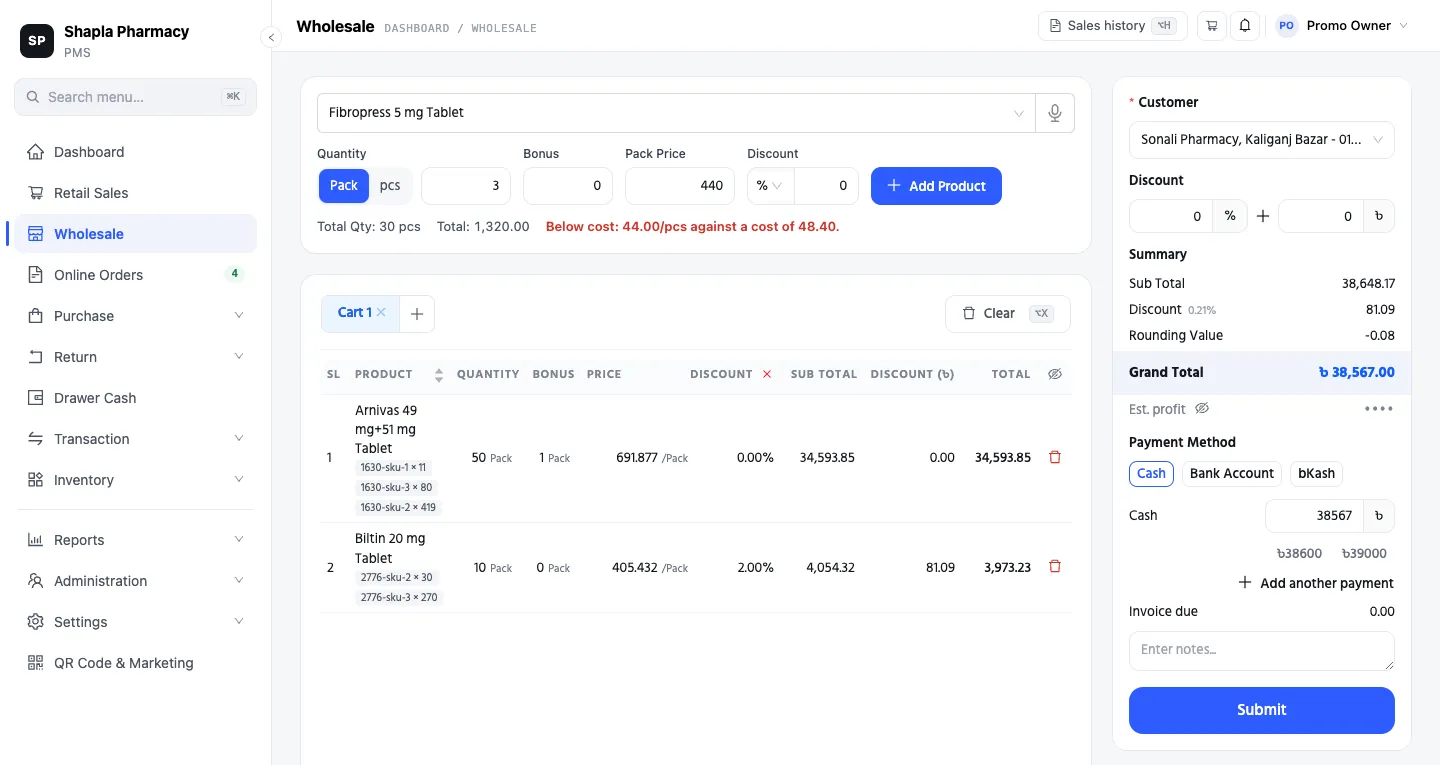 The shop, customer and figures in this screenshot are demo data. Two lines
in packs already sit in the cart, one with a bonus pack and one with a line discount;
a third is being typed at 440 a pack, and before anything is saved the screen
says it would sell below cost.
Either way, the thing that used to happen silently, a three percent margin turning negative because a line discount was typed one digit wrong, now happens on the screen, in front of whoever is about to save it.
Where it shows up
Everything the wholesale door records lands where the rest of your shop’s figures already live.
One thing to say plainly, because it changes a number you already read: the Sales line of your Profit & Loss now carries retail only. Wholesale shows on its own Wholesale Sales lines, so the margin on your wholesale trade reads straight off the statement instead of being blended into the retail figure. A shop that has never sold wholesale sees exactly the statement it always had.
The Sales and Sales Return reports gain a Trade filter, All, Retail or Wholesale, with All as the default, so no total you have been comparing month to month changes. Wholesale returns go through the same Sales Return screen as retail ones, behind their own permission. Stock, customer dues and the drawer see a wholesale sale as what it is: a sale.
If you turn it off later
Wholesale is a setting, not a commitment. Turn Enable Wholesale Selling off and the Wholesale menu goes away and no new wholesale sale can be struck, but the wholesale invoices already on the books stay returnable and stay in the reports. The trade’s history is never stranded.
Where this fits
Are you actually making money? asked whether the sales figure you know and the profit figure that matters have drifted apart. In a shop with a wholesale side kept off the books, they have, by the whole of that side. Customer baki put the reseller’s dues on a name; this puts his deal on the record at the price it was actually struck. The counter is the same. The books, at last, hold both trades.
Next time the man from the village pharmacy says “the usual”, open Wholesale, pick his name, and type 20. The price is already there.
This is part of a series for pharmacy owners: Are you actually making money? · Customer baki without losing money · The supplier khata, without the khata · the full tour. Everything the wholesale counter does is on one page: pharmacy wholesale software. Wholesale is not switched on in the demo shop, so message us on WhatsApp or call, and we will strike one deal with you on your own medicines and prices: a customer, twenty packs with one free, and a price pushed under cost to read the warning.